

A Beautiful Website Can’t Outrun Bad Hosting
Businesses spend weeks refining their website design, months debating branding, and countless meetings polishing homepage copy. Then hosting gets chosen in five minutes. That is like spending three months training for the NYC marathon, and then wearing a pair of Keds for race day.
WordPress hosting is part of your website’s infrastructure. Your design, content, forms, images, SEO, and lead-generation tools all depend on that foundation. Hosting affects your revenue as well. B2B websites that load in one second have conversion rates 3x higher than sites loading in five seconds.1
Visitors rarely think about hosting, but they notice when something goes wrong. If a page takes too long to load, they may leave before they ever see your offer. If the website crashes, they may question whether your business is reliable. And if a security issue takes the site offline or compromises customer information, your team can end up spending days fixing a problem that should have been prevented.
Hosting cannot fix every website problem. It gives every other investment a stronger chance to perform. Ahead, we’ll break down what WordPress hosting is, why it matters, the different options available, and how to choose the right setup for your business.
What Is WordPress Hosting?
WordPress hosting is web hosting configured specifically to run WordPress websites.
Generic hosts support many applications. WordPress-specific providers shape their servers, tools, and support around one platform. These plans may include preinstallation, backups, updates, and developer tools.2
The setup commonly includes:
- PHP optimization: Configuring the language that processes WordPress code for greater efficiency.
- MySQL optimization: Tuning the database that stores posts, settings, and user information.
- Memory allocation: Providing enough working memory for themes, plugins, and requests.
- Caching: Saving reusable content so the server performs less repeated work.
- Server resources: Assigning processing power, storage, and bandwidth to the website.
- WordPress-specific settings: Configuring security, scheduled tasks, files, and URLs around WordPress.
The result is typically smoother performance with less manual configuration.3
Together, these features help your website load faster, stay stable during traffic spikes, and reduce the risk of technical problems interrupting your business. For your visitors, that means pages open quickly, forms work properly, and the site feels reliable.
WordPress Hosting vs. Traditional Web Hosting
One of the biggest misconceptions about WordPress is that WordPress hosting is something completely different from web hosting. It isn’t. WordPress hosting is web hosting. The difference is that it’s specifically configured to make WordPress run better.
Think of two mechanics in Queens. One works on every make and model. The other specializes only in BMWs. Both understand cars, but the specialist knows the recurring issues, preferred parts, and platform-specific fixes before opening the hood. That’s what WordPress hosting does.
WordPress powers 41.5% of all websites and 59.2% of websites whose content management system is known.4
With a platform that is widely used, specialized infrastructure and support are practical business advantages. They can reduce troubleshooting, simplify maintenance, and help teams address WordPress problems without translating everything for a general-purpose provider. That’s why our website designers trust WordPress for all our clients’ hosting needs.
Traditional web hosting supports many platforms.
Web hosting with WordPress on a general-purpose server can work perfectly well. The same environment may also support:
- Drupal: A flexible content management system often used for large, complex websites.
- Joomla: A content management system that supports websites, portals, and online communities.
- Laravel: A PHP framework developers use to build custom web applications.
- Static HTML websites: Simple websites made from fixed files that do not rely on a database.
- Custom applications: Purpose-built tools or platforms created for a company’s specific needs.
That flexibility makes traditional hosting useful for organizations managing several technologies.
The tradeoff is specialization. A general hosting provider is built to support many kinds of websites, so WordPress may not get the same level of attention or fine-tuning. That can mean more setup, more troubleshooting, and a greater chance that your team will need outside technical help when something stops working as expected.
WordPress hosting is optimized for one platform.
Providers focused on WordPress hosting can tune their environments around the platform’s recurring demands.
That commonly includes:
- Current PHP configurations: Using an up-to-date version of the programming language WordPress relies on.
- Database tuning: Organizing and improving the system that stores your website’s content and settings.
- Server-side caching: Saving frequently used website information so pages can load faster.
- Automated WordPress updates: Installing important software updates without requiring your team to handle them manually.
- Security rules targeting common WordPress threats: Adding protections against attacks that commonly affect WordPress websites.
These features reduce the amount of manual setup required from the website owner.
The difference can feel like taking the express train so you don’t have to wait at every station. Both routes may reach the destination, but one removes unnecessary time stops. WordPress-specific optimization cannot compensate for bloated plugins or poor development, but it can provide a faster and more stable starting point.
Support is dramatically different.
Generic hosts usually focus on keeping the server online and resolving basic account problems. Providers specializing in WordPress site hosting may also help investigate:
- Plugin conflicts: Problems that occur when two or more website tools do not work properly together.
- Theme problems: Issues with the design framework that controls how the website looks and behaves.
- Failed updates: Software updates that do not install correctly or cause parts of the website to stop working.
- Database issues: Problems with the system that stores your website’s content, settings, and user information.
- Caching errors: Issues that cause visitors to see outdated content or experience loading problems.
- Performance bottlenecks: Specific parts of the website that slow down pages or put too much strain on the server.
The exact support included varies by provider, so businesses should review plan terms before buying.
For a company without an internal WordPress expert, specialized support can be a major advantage. Instead of bouncing between a hosting company, plugin developer, and freelance technician, the team has a better chance of reaching someone who recognizes the problem and knows where to begin.
Four Types of WordPress Hosting Explained
Once business owners understand WordPress hosting, the next question is usually which type they need. The answer depends on traffic, growth expectations, maintenance responsibilities, and budget.
Downtime can become expensive fast. ITIC’s 2024 survey reported that 90% of respondents faced hourly downtime costs exceeding $300,000.5 Smaller businesses may lose less per hour, but missed leads and damaged trust can still sting like a surprise Midtown parking ticket.
Choosing the wrong plan is rarely catastrophic. You may simply outgrow it or pay for resources you never use. The goal is to match the hosting environment to the role your website plays in the business.
1. Shared WordPress Hosting
For a small business looking for affordable WordPress web hosting, shared hosting is often the starting point. Shared hosting keeps costs low by placing several websites on the same server.
- Best for: Startups, personal websites, small businesses, and low-traffic sites
- Advantages: Low pricing, simple setup, and beginner-friendly tools
- Limitations: Fewer resources, less control, and slower performance during traffic spikes
Sharing resources works until several websites need them at once. It is similar to squeezing onto the 6 train at rush hour. Everyone gets aboard, but nobody gets much room.
2. Managed WordPress Hosting
Managed hosting puts routine technical work in the provider’s hands. Businesses using web hosting with WordPress often choose a managed plan when they do not want employees handling server maintenance.
- Best for: Businesses that rely on their website and want less hands-on technical work
- Advantages: Automatic backups, security monitoring, WordPress updates, caching, staging environments, and performance optimization
- Considerations: Higher monthly costs than shared hosting and fewer opportunities for advanced server customization
The provider handles much of the operational work, allowing the business to focus on content, sales, and customers.
Managed plans cost more than shared hosting, but the additional support can reduce emergencies, maintenance hours, and calls to developers when an update goes sideways.
3. VPS WordPress Hosting
A VPS provides dedicated resources without requiring an entire physical server.
VPS plans are commonly used for growing businesses that need more control over their WordPress site hosting.
- Best for: Ecommerce sites, expanding businesses, and websites with higher traffic
- Advantages: Better scalability, stronger performance, and greater server control
- Considerations: More technical management and higher costs than shared hosting
Dedicated hosting takes the next step by assigning one physical server to one customer. It offers maximum control and performance, but it is generally reserved for enterprise organizations, mission-critical websites, and unusually high traffic.
4. Cloud Hosting
Cloud hosting spreads the workload across multiple connected servers. Instead of depending on one machine, cloud environments distribute the resources needed for WordPress hosting.
- Best for: Growing businesses, websites with unpredictable traffic, and companies that need stronger reliability
- Advantages: Improved uptime, easier scaling, infrastructure redundancy, and flexible resource allocation
- Considerations: Pricing can vary with usage, and some plans may require more technical oversight
If one server develops a problem, another may be able to pick up part of the workload. That flexibility is useful for websites with unpredictable traffic or rapid growth.
Cloud hosting can also make scaling easier because resources can be adjusted without migrating the entire website to a new physical server. That’s why e9digital uses it to ensure our clients can grow their website as needed.
Why Hosting Helps Google Trust Your Website
Hosting does not directly increase SEO rankings. Buying an expensive hosting plan will not magically move your homepage from page five to page one. But hosting affects many of the signals Google does care about, including loading speed, uptime, Core Web Vitals, security, and reliability.
Google recommends improving Core Web Vitals because they measure the real-world experience visitors have on your website.6 Your hosting environment can influence several of those measurements before you ever design the first page or start making development changes.
The right hosting helps build trust with Google through:
- Better uptime: Google cannot crawl or rank pages it cannot access. Reliable hosting reduces the risk of your website being unavailable.
- Faster loading: Server response time can affect Largest Contentful Paint, one of Google’s Core Web Vitals.7
- Better crawlability: A stable website makes it easier for search engines to visit and review your pages consistently.
- Stronger security: Malware can damage search visibility. Many WordPress hosts include firewalls, login protection, security monitoring, backups, and automatic updates.
- Easier maintenance: Managed hosts often automate updates and backups, which make it easier to restore a website after human error, a server failure, or a security incident.8
Hosting supports the technical foundation your SEO strategy depends on.
How Much Does WordPress Hosting Cost?
“The cheapest monthly payment can become an expensive nightmare when performance or support disappears.” — Conrad Strabone, Managing Partner & President | e9digital
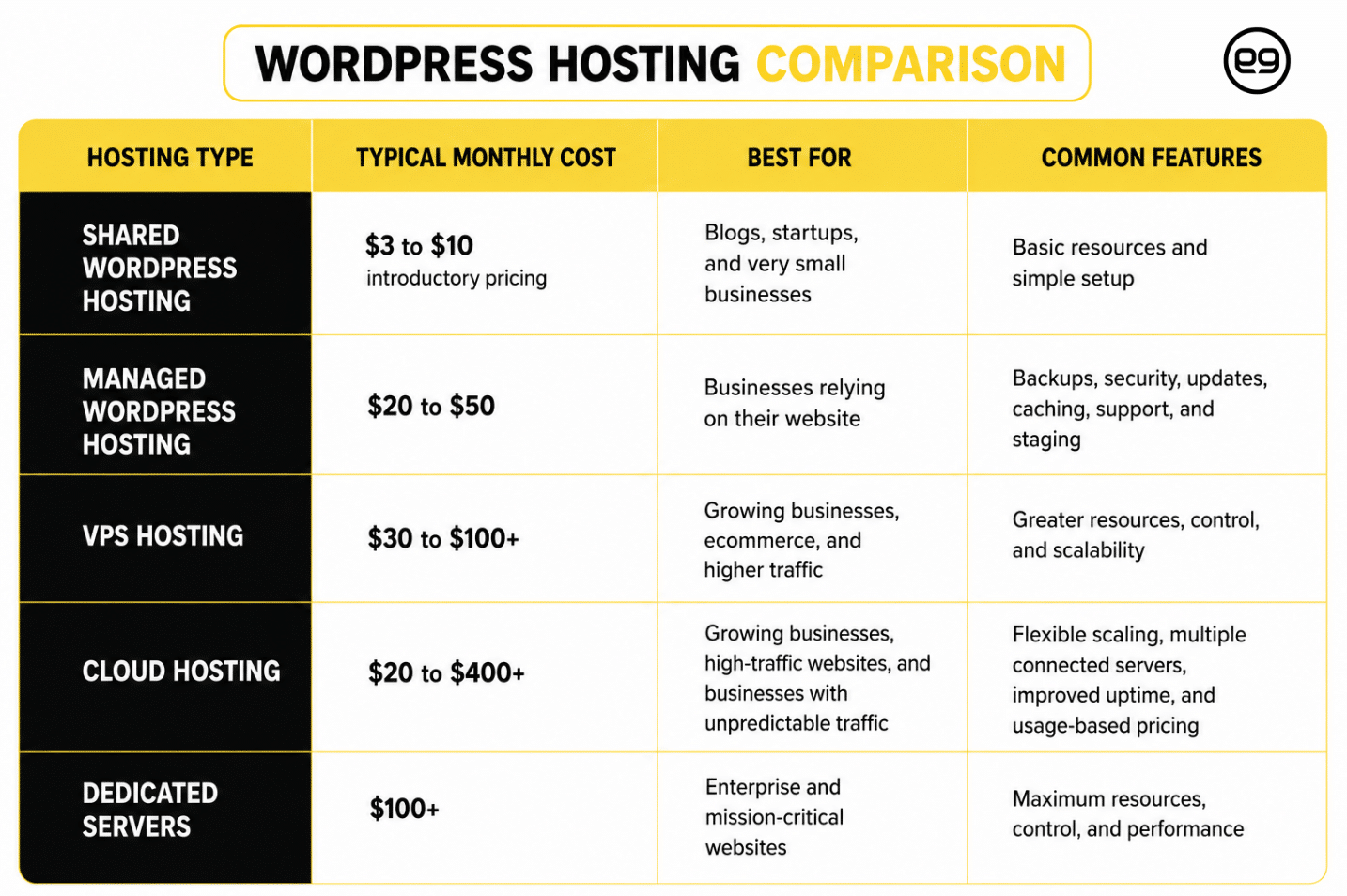
When business owners ask what WordPress hosting is going to cost, the honest answer depends on the website’s role.
A personal blog has different requirements than an ecommerce store or lead-generation website. Focus on total cost of ownership, including support, maintenance, security, and downtime.
How to Choose the Best WordPress Hosting?
The best hosting plan fits the way your business operates, not the way a provider advertises.
Choosing WordPress hosting starts with understanding your website. A brochure site receiving modest traffic has different needs than an ecommerce store processing transactions around the clock.
Review these factors before signing up:
- Speed: Look for SSD or NVMe storage, caching, CDN integration, optimized PHP, and database tuning.
- Backups: Prioritize daily backups, practical retention periods, and one-click restoration.
- Security: Review malware scanning, firewalls, SSL, DDoS protection, login security, and update policies.
- Support: Confirm that the team understands WordPress, not only server accounts.
- Scalability: Choose a plan that can accommodate traffic, content, and functionality as the business grows.
Changing hosts is possible, but selecting wisely now can prevent a stressful migration later.1
Common WordPress Hosting Mistakes
Most hosting plans look similar when you compare them side by side. They promise speed, security, support, and reliable service. The real differences often become obvious only when your website needs help, whether that means more visitors than usual, a broken update, or a technical problem your team cannot solve.
Common problems with hosting plans include:
- Choosing based only on price: A low introductory rate may look attractive, but renewal costs can be much higher. Review what the plan will cost after the first year and what support is actually included.
- Ignoring backups: Backups give you a recent copy of your website that can be restored if something breaks, gets deleted, or is compromised. Without them, a small mistake can turn into a major interruption.
- Assuming hosting includes website maintenance: Your provider may keep the server running, but that does not always include updating plugins, fixing forms, checking integrations, or managing website content.
- Forgetting about growth: Your website may be simple today, but new services, campaigns, products, or customers can increase what it needs to handle.
- Waiting until problems get serious: Moving to better hosting is much easier before your website becomes slow, unreliable, or difficult for customers to use.
Your Website Deserves Better Than “Good Enough”
“Nobody hires you because your hosting company is amazing. They hire you because your website is fast, reliable, secure, and always ready when they need it. Great hosting helps make that happen.” — Conrad Strabone, Managing Partner & President | e9digital
Hosting may never receive the applause that design, branding, or campaign strategy gets. But strong WordPress web hosting gives each of those investments a better chance to produce results.
At e9digital, we approach hosting as part of a complete website strategy. We consider performance, security, maintenance, user experience, scalability, and the marketing systems connected to the site.
Your website should be ready for the next lead, traffic increase, successful campaign, and business opportunity. Schedule a call with e9digital to build a website and hosting strategy designed to perform long after launch.
Frequently Asked Questions About WordPress Hosting
Is WordPress hosting the same as web hosting?
No. WordPress hosting is a type of web hosting configured specifically for WordPress websites.
Traditional hosting may support numerous platforms and custom applications. WordPress-specific plans focus on the technical requirements of WordPress and may include preinstallation, backups, updates, or developer tools.9
The underlying service is still hosting. The difference is how closely the environment and support team are aligned with WordPress.
Is WordPress itself free?
Yes. The WordPress software used for hosting WordPress websites is released under the GPL open-source license.9
Businesses usually still pay for related services, including:
- Hosting
- Domain registration
- Premium themes
- Paid plugins
- Development
- Maintenance
The final cost depends on the website’s size, functionality, traffic, and support requirements.
Do I need managed WordPress hosting?
Not always. Small personal websites may operate successfully on shared web hosting with WordPress.
Managed hosting can make more sense when a business depends on its website for leads, sales, publishing, customer service, or internal operations.
The provider may handle backups, updates, caching, security monitoring, and other technical responsibilities. Review the plan carefully because the meaning of “managed” varies between providers.
Does hosting affect SEO?
Indirectly, yes. WordPress site hosting can influence page speed, uptime, security, and Core Web Vitals.
Google describes Core Web Vitals as measurements of real-world user experience and recommends evaluating page speed and HTTPS as part of a strong page experience.13
Hosting alone will not earn rankings. Content quality, relevance, internal linking, authority, and technical optimization still matter.
Can I change hosting providers later?
Yes. A WordPress migration can move the website’s files, database, and configuration to a different provider.
Google provides guidance for changing hosting infrastructure without changing website URLs, including testing the new environment and monitoring the move.9
Some providers include migration assistance, while others charge for it. Confirm what is included before opening an account.
Does WordPress hosting include a domain name?
Sometimes. A WordPress web hosting provider may include a free domain for an introductory period or offer registration as an add-on.
Your domain directs visitors toward the server where the website is hosted. Keeping the domain and hosting with one provider may simplify billing, while separating them can provide greater flexibility.
Always verify renewal costs and ownership details.
How often should a WordPress website be backed up?
A frequently updated WordPress hosting environment generally needs more frequent backups than a static website.
An ecommerce store or lead-generation site may require daily or more frequent backups. A website updated only a few times each year may need them less often.
Back up both the files and the database, store copies separately from the live server, and confirm that restoration actually work
Can one hosting plan support multiple WordPress websites?
Yes, some WordPress web hosting plans allow several websites under one account. The permitted number depends on the provider and plan.
WordPress also supports Multisite, which allows administrators to create a network of websites from one installation, although setup requires additional technical configuration.
Review storage, traffic, security, backup, and support limits before placing several business websites in one account.
Footnotes
- https://portent.com/blog/analytics/research-site-speed-hurting-everyones-revenue.htm
- https://wordpress.org/documentation/article/hosting-wordpress/
- https://developer.wordpress.org/advanced-administration/performance/
- https://w3techs.com/technologies/details/cm-wordpress
- https://itic-corp.com/itic-2024-hourly-cost-of-downtime-report/
- https://web.dev/articles/vitals
- https://web.dev/articles/optimize-lcp
- https://developers.google.com/search/docs/crawling-indexing/site-move-no-url-changes
- https://wordpress.org/about/license/